

The Backbone of Operations Intelligence
The Date Table


We want to measure this metric on a 75 day rolling period the executive stated confidently.
Excuse me, what? A 75 day period?!? How random is that? I thought to myself. I was in the middle of a stakeholder meeting about a report that I was in the middle of developing for a key piece of a senior executive’s weekly operating review (WOR). I thought the date window request was totally random, but didn’t flinch, because I had my trusty date table with offsets, that would make implementing this request a breeze.
Here it was again, reinforced for the 5,587th time that a quality dimensional date table is foundational in operations intelligence.
What makes a date table foundational? One word: context.
You can have millions of rows of data from all of your machines or your finish dates or a list of things that a process has “accomplished” but there’s no context. No way to related to today. Or to last week, last month, or year, or whatever the case is. The date table gives that to you.
Yes, if you had the skills to dive into SQL (a data language), you could technically group by that date and have some sort of idea of what is going on. But what about the dates where nothing was accomplished? Was work completed on a weekend? What about holiday? A high quality date table has all of these attributes defined and provides context in that specific scenario.
Building off of that, what was the execution rate over the past week? Did it increase or decrease from the prior week. Again, the date table helps you do that.
Now that we understand why a date table is important, let’s look at what a quality date table includes.
Date
Year start/end
Quarter start/end
Month start/end
Week start/end
Offsets for all period intervals (year, quarter, month, week, day)
Weekend flags/Booleans
Holiday flags/Booleans
Custom calendars definitions as needed (4-4-5, non-standard start month, and others)
Handling Missing Dates
For the technical readers, let’s talk about handling dates where nothing happens. This is also known as data sparsity.
How does a date table help you handle this? Let’s look at how we would write SQL to solve for this:
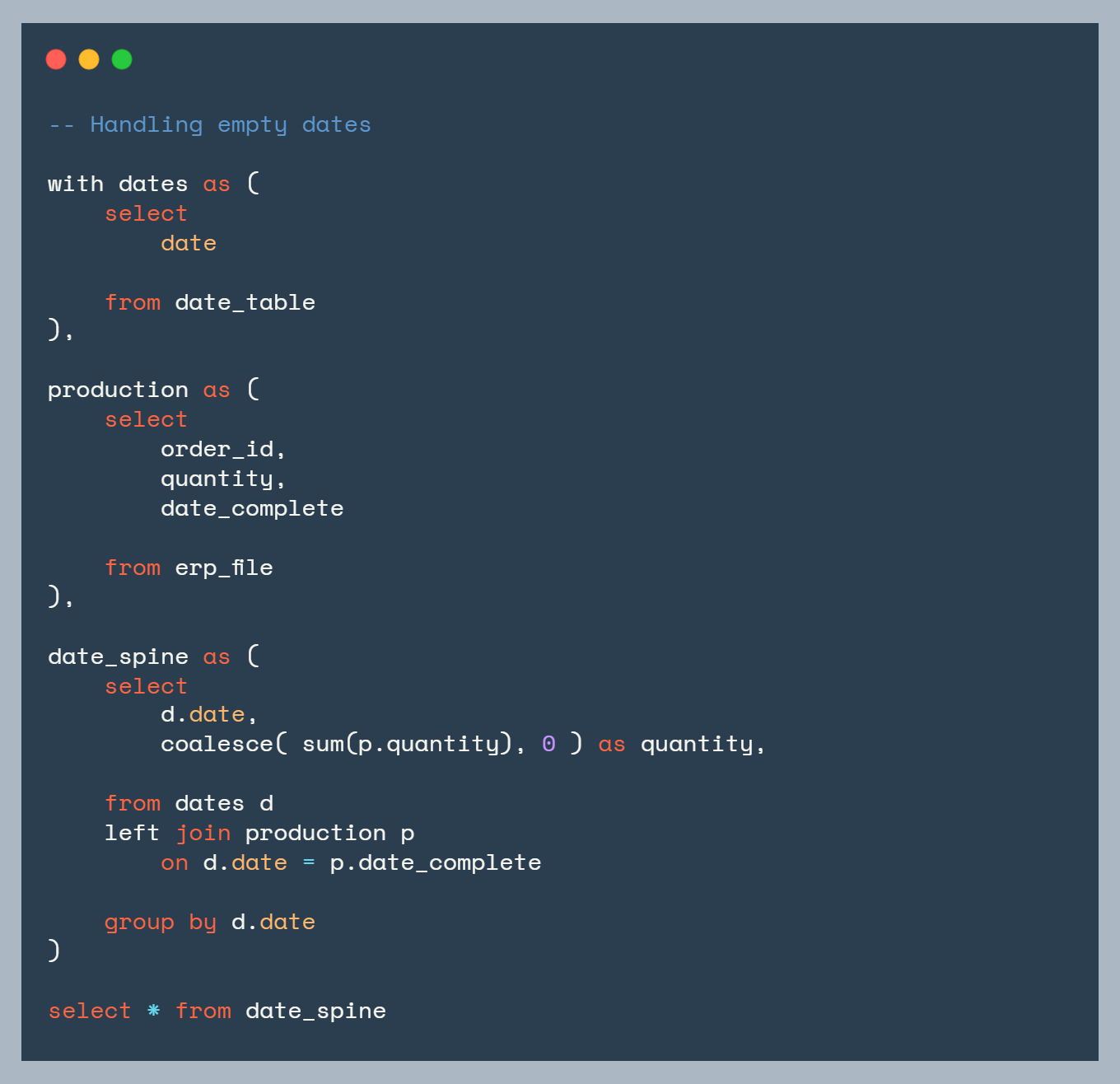
What’s happening here?
First, we call the date table. Next, we pull in the production/ERP data. Finally, we join the two tables together with a left join.
What makes this work is the date table being on the left side of the join. This means a date will always return, even if there was no production for that day. If desired, you can use the coalesce function to return a zero instead of a null value.
Date Offsets
Let’s go back to the opening story about the rolling 75 days metric. How do you handle that? How do you do that confidently and quickly? Date offsets are the answer.
What are date offsets?
Date offsets are pre-calculated columns that tell you “how many days/weeks/months ago was this date compared to today?”
For example:
offset_day= -75 means “75 days ago”offset_week= -10 means “10 weeks ago”offset_month= -3 means “3 months ago”offset_year= 1 means ”next year”
This pattern makes complicated date analysis simple and context aware.
In SQL this looks like:
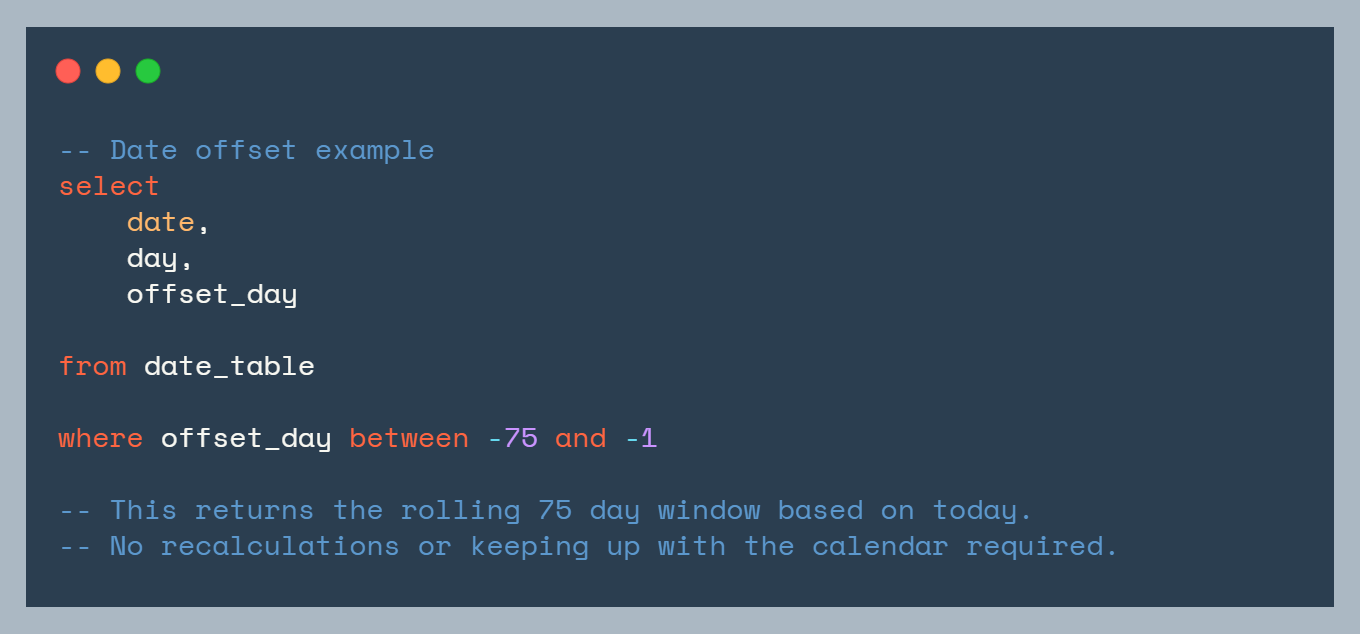
No complex DATEDIFF logic. No fragility when the year rolls over.
Where to get a quality date table
I was very fortunate to have learned from the best, and find them very early. For Power BI/Power Query users, Melissa de Korte’s Date table is the gold standard for date tables. Her date table can be found on the Enterprise DNA website:
Melissa’s table is a great place to start. If you want to add time zone awareness, here is a GitHub link to bolt that on to Melissa’s table for your locale.
I actually loved Melissa’s date table so much, that I created a trimmed down in SQL. Here’s a link to the GitHub repo.
That’s it for now
We covered date tables why they are important:
How to identify when data is missing from dates
How to execute arbitrary date calculations with ease
Shared date table resources for those looking to get started
If you have any comments/questions, drop them below.
Thanks for reading!